Tampilkan postingan dengan label images. Tampilkan semua postingan

Kamis, 05 Desember 2013

Use-your-Drive | Google Drive plugin for WordPress (Utilities)

Use-your-Drive | WordPress Plugin


This plugin will help you to easily integrate Google Drive into your WordPress website or blog. Use-your-Drive allows you to view, download, delete, rename files & folders directly from a WordPress page. You can use Use-your-Drive as a filebrowser, gallery, audio- or video-player!


NOTE: Use-your-Drive uses the Offical Google API.


Features


Filebrowser


  • View Google Drive folders & files directly on your site

  • Upload form so users can upload (multiple) files to Google Drive

  • Add, delete and rename files & folders

  • Download files as zip file

  • Search your Google Drive for files & folders

  • If needed you can restrict users so they are only able to use their ‘own’ Google Drive folder


Gallery


  • Great looking grid with lightbox

  • Folder thumbnails shows whats inside the folder

  • Customize image row height

  • Shuffle images

  • Add, delete and rename images

  • Download images as zip file


Audio & Video


  • Streams audio files directly from your Google Drive with a HTML 5 audioplayer with flash-fallback.


    • .m4a (AAC/H.264)


    • .oga (Vorbis/Theora)


    • .mp3


  • Streams video files directly from your Google Drive with a HTML 5 audioplayer with flash-fallback.


    • .webmv (Vorbis/VP8)


    • .ogv (Vorbis/Theora)


    • .m4v (AAC/H.264)


General


  • Sort files by name, size or modified date


  • Restrict viewing by file extension and file or folder name


  • Restrict uploading files by file extension


  • Restrict which user can see, download, rename or delete your files or upload new ones. You can set the required capabilities by yourself with WordPress Capabilities


  • Secure OAuth 2 authentication


  • Powerful but intuitive shortcode generator


  • Multi language supported


  • And finally… All elements are responsive!


Do you miss a feature? Let us know!

Requirements


  • At least PHP 5.3 with cURL extension


Screenshots


Use your Drive - Google Drive plugin for WordPress


Changelog


= 1.0.1 (26 November 13) =


  • Added WordPress Multi-Site support


  • Bug fix caching Google API requests


  • Bug fix streaming audio/video files


  • Bug fix Lightbox gallery


= 1.0 (22 November 13) =


  • Initial release version

Scroller Gallery 2 - Recent Posts Teaser WordPress (Galleries)

Intro – top


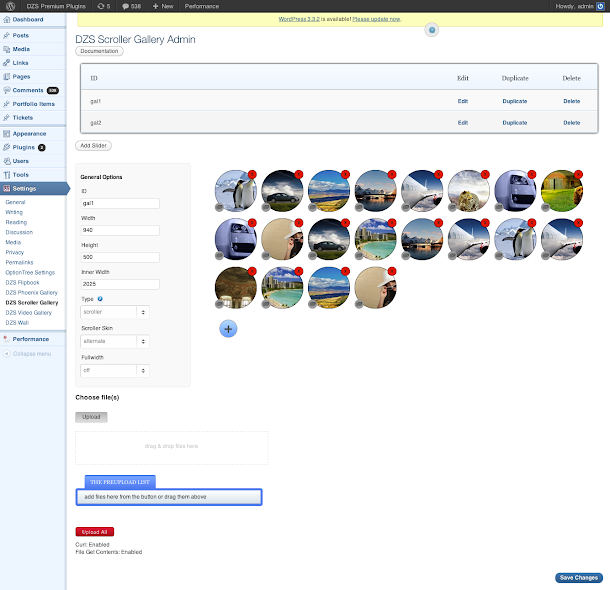
DZS Scroller Gallery is the ultimate media gallery that you can use for showcasing your portfolio, photographs or even video shots. The gallery consists of thumbs layed out in a grid format that can have a description and link set on them. The link can also be a lightbox link so it can pop up a lightbox like ZoomBox 2 to launch images or videos.


Features


  • supports any image size, layout will be made automatically via Masonry

  • insanely easy to use just add the items in the admin panel, then include it into your page via a simple
    shortcode [scrollergallery id=”theid”]
  • fully responsive it goes from mobile to HD. You can place it in any element and it will
    adapt to it’s width

  • fully skinable via CSS

  • custom lightbox one of a kind, custom-built lightbox included

  • lightbox galleries separate items in the same gallery by lightbox galleries

  • unlimited galleries have unlimited galleries in the DZS Admin Panel V2. You can have unlimited
    galleries on any page too.

  • inline content support – you can have videos or any other html content on the thumb or the description

  • compatible with iPhone / iPad

  • extensive admin panel – admin panel with lots of options to make the gallery as customizable as possible, yet easy to use. Comes with a drag & drop html5 uploader too! And awesome functionality like drag & drop for items, duplicate galleries etc. to make your life easier while editing the gallery. You can setup unlimited number of galleries in the admin as well as put them in the content.

  • backup database / import, export feature - keep your database safe and do regular backups via the Export Database feature included with this plugin.

  • easy to install - install and get this plugin ready in less then three minutes. Add it to your content via a simple shortcode – [scrollergallery id=”theidyousetintheadmin”] .


Updates


For updating, disable and delete the previous version, and install the new downloaded one. Or just unpack the zip you get from the download and overwrite the previous folder from wp-content/plugins/


UPDATE 1.01 [ 07/03/2013 ]


  • [FIX] a undefined index bug


What do you get?


  • Scroller Gallery 2 WordPress plugin – get creative!

  • sample data – the preview admin configuration which you can import in your own

  • documentation – extensive documentation on how to install & configure the plugin ( check the readme folder after you unpacked the package )

  • free updates – even if the value of this gallery increases with upcoming updates, you will get them for free

  • free support – for installation via our forum -> http://digitalzoomstudio.net/support/ this is the fastest form of support


Admin Preview


ImageShow - Wordpress InView Popout Image Gallery (Galleries)

Features:


  • Masonry Layout

  • Popout Images

  • Image Rotation and Scale Effects on Hover

  • Option Social Icons and Title Bar

  • Set Larger Images

  • Full shortcode control of speeds, rotation, scale amount, larger image size, margins, image widths etc

  • Fly In and Out animations when images are inview or not inview.

  • Use any images via Wordpress media tool.

  • Add unlimited galleries per page.

  • Custom prettyPhoto lightbox inclusion.

  • Link to images, internal pages or external sites.

  • Wordpress 3.7 + compliant.


Note: Hover effects not available on touch screens – Social icons disabled on touch screen devices and do not show correctly in Safari, Chrome and Opera browsers.

Grid Gallery with Custom Links Pro (Galleries)


If you have WordPress gallery of images and need to link them to other pages, this plugin is for you.


  • Displays images in a grid.
    Live Preview

  • Responsive.
    Live Preview

  • Mobile friendly.

  • Easy to add to any page or post.
    Live Preview

  • You can add captions and long description to each of the images.
    Live Preview

  • You can add internal or external links to images and captions.

  • Crossfade on Hover and other visual effects.
    Live Preview

  • Fully customizable to match your WordPress theme.
    Live Preview


On Line
Documentation and Live Previews


Perfect plugin to create:

  • Sponsor links page.

  • Portfolio page.

  • Recipes page.

  • Products page.

  • Restaurant menu page.

  • File downloads page.

  • Navigation page.

  • Categories page.

  • External links page.


Features


  • Responsive when used with responsive theme.

  • Easy to add to any page or post. Just insert a shortcode.

  • Integrated with Media Library. It uses WordPress gallery for upload and image management.

  • Not limited to thumbnails. You can select any image size from your Media Library.

  • Images can have different sizes.

  • Unlimited number of images. Add as many images as you wish.

  • You can add captions and long description.

  • A few text layouts to choose from.

  • Image frames, drop shadows, cross-fade on hover and other visual effects.

  • Support for multiple Grid Galleries on a single page.

  • You can add custom JavaScript, to track clicks on outbound links.

  • Mobile friendly. Tested in all major browsers and mobile devices.

  • Highly customizable from the back-end. For full control, you can add custom CSS.

  • Translation Ready.

  • Guaranteed support. We always do our best to help and give support when needed.

  • Regular plugin updates. Grid Gallery with Custom Links Pro is always tested with the latest version of WordPress.


Installation


This plugin requires
Media Library Custom Fields
to be installed.


Media Library Custom Fields is our free plugin available for download from WordPress Plugins Directory. It’s tested and fully compatible with Grid Gallery
with Custom Links Pro.


Grid Gallery with Custom Links Pro
Installation Instructions

Stretch Gallery WordPress plugin (Galleries)

Stretch Gallery WordPress plugin is a HTML5 canvas gallery that allows you to create a nice portfolio gallery with some nice effects and customization settings.


Stretch Gallery HTML5

Mate Boxes | Wordpress Plugin (Galleries)

Mate Boxes is a plugin for Wordpress that allows you to create data blocks using your images.
There is a admin panel which can help you to change the visualisation of your blocks.
You can use various columns for different types of screens. For example: for large screens – 6 columns,
for medium screens – 4 columns, for small screens – 2 columns, for extra small screens – 1 column.
You can completely disable the area for the title, the lower and middle part of the block, and leave only the image.
You can see video preview for more information: video


Features:


  • Easy sorting system

  • Automatic color adjustment

  • Unlimited number of galleries with blocks on the same site or page

  • Responsive

  • Simple to Use

  • Cross Browsers

  • Fully Customizable

  • Mobile Friendly

  • Lightbox

  • Various Columns for Different Types of Screens


Video Preview:


Version 1.1:
New overlay style
Bug fixed: sorting images in IE


Version 1.0:
First release


Photos are not included in the template. (photo by Csaba Diglics stockpicturedownload.com)
Icons by Daniel Bruce (entypo.com)

Mate Folio | Wordpress Plugin (Galleries)

Mate Folio is Wordpress plugin for your images gallery. You can use various columns for different types of screens.
For example: for large screens 6 columns, for medium screens 4 columns, for small screens 2 columns, for extra small screens 1 column.
You can see video preview for more information: here


Features:


  • Responsive

  • Simple to Use

  • Cross Browsers

  • Fully Customizable

  • Filtration by Category

  • Mobile Friendly

  • Lightbox

  • Title for Images

  • Various Columns for Different Types of Screens


Video Preview:


non-Wordpress version: Mate Folio | jQuery Plugin


User Interface:


user-interface


Title for Images:


title-for-images


Version 1.4:
New Overlay Style
New Lightbox
Title for Images
New Options


Version 1.3:
New overlay style
Bug fixed: sorting images in IE


Version 1.2:
Various icon for image overlay


Version 1.1:
Radio Button bug fixed
Color Picker Added


Version 1.0:
First release
Wordpress 3.7 supported


Photos are not included in the template. (photo by Csaba Diglics stockpicturedownload.com)

FlickrShow 2.0 For Wordpress (Galleries)

Build an interactive inview masonry picture wall from your Flickr images.


  • Create Gallery from User Photostream, Set Number or Search Term

  • Inview hide and show animation.

  • Popout scaling animation on image mouseover with alternating slight rotate animation of images for dramatic effect(Most browser support).

  • Masonry layout.

  • Pure CSS3 animations on inview load and on mouseover.

  • Optional Watermark over images on image mouseover.

  • Set larger images(static or random).

  • Title, author, views count visible information.

  • Customized prettyPhoto lightbox slideshow.

  • Photo caching for performance.

  • Shortcode options include:scale, popout_speed, image_size, thumb_size, width, num_images, margin, larger_images, larger_image_set, larger_random, larger_images_multiplier, set_number, flickrname, search, cache, cache_duration, visible_at_start, watermark_url, social_icons, sort, group.

  • Fully Responsive relayout and sizing.

  • Social Share Buttons(Firefox, IE9+, Safari) – Not on mobile browsers.

  • Mobile browser support


Side Note: If you are loading a bunch of large images and it takes a while for page loads this is normal. Even with image caching it takes a while for any server to load several images at once. Please do not complain about load times. Every step has been taken to improve image loading times.


Credits:
Code – jquery.masonry, jquery.prettyPhoto, jquery.inview, phpflickr
flickr images – Sunniva Trana, o2chi, CubaGallery

Ditty Image Ticker (Galleries)


Ditty Image Ticker 1.0.0


This plugin requires Ditty News Ticker to be installed.


Ditty Image Ticker is a multi-functional image display plugin. Easily add multiple images to your site either through shortcodes, direct functions, or in a custom Ditty News Ticker Widget.


Create a dynamic display of unlimited images on your site with a multitude of settings. Display images in a scroller, rotator, list, or widget. Please refer to the Ditty Image Ticker help page for in depth descriptions of all settings.


Different ways to use this plugin


  • Create a scrolling list of images

  • Create an easy image rotator with multiple options

  • Create an image list widget

  • Scroll your favorite images across the top of your site!


What’s NEW from Metaphor Creations:


Update Log


= 1.0.0 =

  • Initial upload of Ditty Image Ticker.

NuvuScroll For Wordpress - Touch Enabled (Galleries)

NuvuScroll For Wordpress – Touch Enabled Scrolling Gallery


Features


  • Add unlimited amount of images.

  • Link images to pages or file.

  • Scroll left and right through the gallery

  • MouseWheel and Arrow Key activation.

  • Custom prettyPhoto lightboxed images.

  • li> Swipe enabled – swipe left and right on touch enabled devices to move the scroll


Uses basic HTML to set up the gallery. I provide the code to copy and paste into your page and you just insert your images inside it.
See the demo page to see the code used.

TableLite Wordpress Post Media Gallery (Galleries)

Popout Table Style Post Gallery Plugin For Wordpress.


  • Wordpress Table Style Post Gallery

  • Popout Content – Popout full content panel for easy post reading.

  • Custom Content – Easily add custom content in place of the featured image or to the excerpt area – Add embed content easily.

  • Shortcode Enabled – Add shortocde to any page to add a gallery.

  • Endless Parameters – Fully Customizable.

  • Comment Displays – View most recent post comments.

  • Set Posts Per Page – Set how many posts are displayed per page.

  • Responsive – Gallery items are automatically adjusted for the amount of posts per page set.


  • Video Embedding – Custom html content and video embedding enabled on summary(back) panel above the exceprt text. Embed Vimeo videos.


  • Lightboxed Images – All images added to the post(gallery images) are linked to the prettyPhoto lightbox.


  • Options – Set title lengths, post category name, post order, icon size, posts per page, max number of pages and more.

  • CSS Transitions Effects – Popout Panel Effects.

  • Browser Compatibility – All major browsers supported.

  • Videos and shortcode examples and parameter option doc built into the plugin settings file.

  • Great for creating Video (Vimeo, screenr..) or SoundCloud(or spotify, rdio etc) galleries. (No YouTube Embeds)

  • Built in admin doc with examples, parameters, video, template

  • Same great support

Scroller Gallery 2 - Recent Posts Teaser WordPress (Galleries)

Intro – top


DZS Scroller Gallery is the ultimate media gallery that you can use for showcasing your portfolio, photographs or even video shots. The gallery consists of thumbs layed out in a grid format that can have a description and link set on them. The link can also be a lightbox link so it can pop up a lightbox like ZoomBox 2 to launch images or videos.


Features


  • supports any image size, layout will be made automatically via Masonry

  • insanely easy to use just add the items in the admin panel, then include it into your page via a simple
    shortcode [scrollergallery id=”theid”]
  • fully responsive it goes from mobile to HD. You can place it in any element and it will
    adapt to it’s width

  • fully skinable via CSS

  • custom lightbox one of a kind, custom-built lightbox included

  • lightbox galleries separate items in the same gallery by lightbox galleries

  • unlimited galleries have unlimited galleries in the DZS Admin Panel V2. You can have unlimited
    galleries on any page too.

  • inline content support – you can have videos or any other html content on the thumb or the description

  • compatible with iPhone / iPad

  • extensive admin panel – admin panel with lots of options to make the gallery as customizable as possible, yet easy to use. Comes with a drag & drop html5 uploader too! And awesome functionality like drag & drop for items, duplicate galleries etc. to make your life easier while editing the gallery. You can setup unlimited number of galleries in the admin as well as put them in the content.

  • backup database / import, export feature - keep your database safe and do regular backups via the Export Database feature included with this plugin.

  • easy to install - install and get this plugin ready in less then three minutes. Add it to your content via a simple shortcode – [scrollergallery id=”theidyousetintheadmin”] .


Updates


For updating, disable and delete the previous version, and install the new downloaded one. Or just unpack the zip you get from the download and overwrite the previous folder from wp-content/plugins/


UPDATE 1.01 [ 07/03/2013 ]


  • [FIX] a undefined index bug


What do you get?


  • Scroller Gallery 2 WordPress plugin – get creative!

  • sample data – the preview admin configuration which you can import in your own

  • documentation – extensive documentation on how to install & configure the plugin ( check the readme folder after you unpacked the package )

  • free updates – even if the value of this gallery increases with upcoming updates, you will get them for free

  • free support – for installation via our forum -> http://digitalzoomstudio.net/support/ this is the fastest form of support


Admin Preview


ImageShow - Wordpress InView Popout Image Gallery (Galleries)

Features:


  • Masonry Layout

  • Popout Images

  • Image Rotation and Scale Effects on Hover

  • Option Social Icons and Title Bar

  • Set Larger Images

  • Full shortcode control of speeds, rotation, scale amount, larger image size, margins, image widths etc

  • Fly In and Out animations when images are inview or not inview.

  • Use any images via Wordpress media tool.

  • Add unlimited galleries per page.

  • Custom prettyPhoto lightbox inclusion.

  • Link to images, internal pages or external sites.

  • Wordpress 3.7 + compliant.


Note: Hover effects not available on touch screens – Social icons disabled on touch screen devices and do not show correctly in Safari, Chrome and Opera browsers.

Use-your-Drive | Google Drive plugin for WordPress (Utilities)

Use-your-Drive | WordPress Plugin


This plugin will help you to easily integrate Google Drive into your WordPress website or blog. Use-your-Drive allows you to view, download, delete, rename files & folders directly from a WordPress page. You can use Use-your-Drive as a filebrowser, gallery, audio- or video-player!


NOTE: Use-your-Drive uses the Offical Google API.


Features


Filebrowser


  • View Google Drive folders & files directly on your site

  • Upload form so users can upload (multiple) files to Google Drive

  • Add, delete and rename files & folders

  • Download files as zip file

  • Search your Google Drive for files & folders

  • If needed you can restrict users so they are only able to use their ‘own’ Google Drive folder


Gallery


  • Great looking grid with lightbox

  • Folder thumbnails shows whats inside the folder

  • Customize image row height

  • Shuffle images

  • Add, delete and rename images

  • Download images as zip file


Audio & Video


  • Streams audio files directly from your Google Drive with a HTML 5 audioplayer with flash-fallback.


    • .m4a (AAC/H.264)


    • .oga (Vorbis/Theora)


    • .mp3


  • Streams video files directly from your Google Drive with a HTML 5 audioplayer with flash-fallback.


    • .webmv (Vorbis/VP8)


    • .ogv (Vorbis/Theora)


    • .m4v (AAC/H.264)


General


  • Sort files by name, size or modified date


  • Restrict viewing by file extension and file or folder name


  • Restrict uploading files by file extension


  • Restrict which user can see, download, rename or delete your files or upload new ones. You can set the required capabilities by yourself with WordPress Capabilities


  • Secure OAuth 2 authentication


  • Powerful but intuitive shortcode generator


  • Multi language supported


  • And finally… All elements are responsive!


Do you miss a feature? Let us know!

Requirements


  • At least PHP 5.3 with cURL extension


Screenshots


Use your Drive - Google Drive plugin for WordPress


Changelog


= 1.0.1 (26 November 13) =


  • Added WordPress Multi-Site support


  • Bug fix caching Google API requests


  • Bug fix streaming audio/video files


  • Bug fix Lightbox gallery


= 1.0 (22 November 13) =


  • Initial release version

Rabu, 04 Desember 2013

Movie Database 2 (Search)

Movies Database 2 is a cutting-edge, feature-rich online database of information related to movies. With super easy installation you can have HUGE movie database script up and running in just few minutes, Application is build on top of bootstrap 3 and optimized for SEO.


Requirements


  • Apache or Nginx Webserver

  • PHP 5.3 +

  • PHP PDO

  • PHP CURL

  • PHP MBSTRING

  • PHP Zlib

  • MySQL

  • Youtube API key

  • TMDB API Key

  • Facebook APP ID and Secret


Features


  • Bootstrap 3

  • Mobile first, Responsive Design

  • TMDB API Integration

  • Youtube API Integration

  • Facebook API Integration

  • Administration panel

  • Cache system

  • Automatic page compression

  • Translation System (100% web manageable)

  • Advertisement management

  • Coded 100% object-oriented

  • 100% automatic movie poster

  • Easy Installation

  • User profile pages

  • User movie collections

  • RSS feeds

Movies Database (Search)

Movies Database is an online database of information related to movies.
Application does not use database and installation is as easy as just uploading files to your webserver.

Movies update Automatically everyday, just upload application and enjoy your new website.


Features


  • No Database Needed

  • SEO Friendly

  • Cache system

  • Translation System

  • 100% object-oriented

  • 100% automatic movie poster

  • Responsive Design

  • Using Youtube API

  • Using TMDB API


Requirement


  • PHP 5.3+

  • Youtube API key

  • TMDB API key


Change Log:


Version 1.6

  • Fixed Youtube Trailers on moveis page

  • Added Images to RSS

  • Added Dutch translation


Version 1.5

  • Added RSS feeds for Now Paying and Upcomming movies

  • Added More movie information:

    • Status

    • Run time

    • Budget

    • Revenue

    • Production Companies

    • Production Countries


  • Changed URL Structure

  • Fixed Title Bug

  • Updated index page layout


Version 1.4

  • Fixed few translation errors


Version 1.3

  • Added actors profile pages

  • Added popular actors page

  • Fixed image download, to force download start

  • Modified search to also search actors


Version 1.2

  • Fixed Selection of movie Trailers

  • Fixed Empty movie page error

  • Modified Application location as it is in documentation

  • Fixed Strip Slashes function in Framework


Version 1.1

  • Added Missing files

  • Small multiple bugfix related to layout

Viral Media Portal (Images and Media)


Viral Media Portal


Viral Media Portal is advanced yet easy to setup and use php script that lets you create media publishing website like (9gag or damnlol) videos, pictures, gifs. It lets you embed videos from vine,facebook, youtube, vimeo, dailymotion and metacafe. Support pictures watermark, video and gif thumbnails watermark, Fully automated thumbnail generation and advanced admin panel to almost control every aspect of the script. You can edit and create as many pages as you want from admin panel enable or disable guest submission, Ad Management, Social Media settings and lot more. Awesome features.


Features


  • Embed videos from vine, facebook, youtube, vimeo, dailymotion and metacafe

  • Custom Pages Creation from admin panel

  • Guest Submission Videos, Pictures, Gifs

  • Thumbnails Generation

  • Keyboard Keys Navigation

  • Watermark Images

  • SEO Friendly URLs

  • Ads Management

  • Pagination, Searching, Sorting

  • Social Media Ready

  • Powerful Admin Panel


Requirements


  • Operating System : Linux

  • Web Server : Apache

  • PHP Version: 5.0 or Higher

  • PHP allow_url_fopen ON

  • PHP GD Library

  • PHP FreeType library

  • PHP CURL Enabled

  • MySql: 5.0 or Higher


Demo


http://www.nexthon.com/vmp/

Admin Demo – (Features Disabled)


http://www.nexthon.com/vmp/admin
Username : admin
Password : admin

Some Users Reviews


Latest Update


Version 1.1


  • Fixed sorting bug.

  • Fixed sometimes sending blank email Bug.

  • Implemented single vote per IP.

  • Enabled sound on Vine Videos by default.

  • Puzzllerry - interactive gallery plugin (Sliders)


    Puzzllerry is plugin that allows you to create interactive gallery/portfolio/menu or any element with listed items. It has extremly simple markup and requires only 1 line of js code to turn it on.


    It will make your website more attractive, it will gain some focus of your visitor as user may ‘play’ with it.


    And of course its responsive.