Tampilkan postingan dengan label sharing. Tampilkan semua postingan

Kamis, 05 Desember 2013

Use-your-Drive | Google Drive plugin for WordPress (Utilities)

Use-your-Drive | WordPress Plugin


This plugin will help you to easily integrate Google Drive into your WordPress website or blog. Use-your-Drive allows you to view, download, delete, rename files & folders directly from a WordPress page. You can use Use-your-Drive as a filebrowser, gallery, audio- or video-player!


NOTE: Use-your-Drive uses the Offical Google API.


Features


Filebrowser


  • View Google Drive folders & files directly on your site

  • Upload form so users can upload (multiple) files to Google Drive

  • Add, delete and rename files & folders

  • Download files as zip file

  • Search your Google Drive for files & folders

  • If needed you can restrict users so they are only able to use their ‘own’ Google Drive folder


Gallery


  • Great looking grid with lightbox

  • Folder thumbnails shows whats inside the folder

  • Customize image row height

  • Shuffle images

  • Add, delete and rename images

  • Download images as zip file


Audio & Video


  • Streams audio files directly from your Google Drive with a HTML 5 audioplayer with flash-fallback.


    • .m4a (AAC/H.264)


    • .oga (Vorbis/Theora)


    • .mp3


  • Streams video files directly from your Google Drive with a HTML 5 audioplayer with flash-fallback.


    • .webmv (Vorbis/VP8)


    • .ogv (Vorbis/Theora)


    • .m4v (AAC/H.264)


General


  • Sort files by name, size or modified date


  • Restrict viewing by file extension and file or folder name


  • Restrict uploading files by file extension


  • Restrict which user can see, download, rename or delete your files or upload new ones. You can set the required capabilities by yourself with WordPress Capabilities


  • Secure OAuth 2 authentication


  • Powerful but intuitive shortcode generator


  • Multi language supported


  • And finally… All elements are responsive!


Do you miss a feature? Let us know!

Requirements


  • At least PHP 5.3 with cURL extension


Screenshots


Use your Drive - Google Drive plugin for WordPress


Changelog


= 1.0.1 (26 November 13) =


  • Added WordPress Multi-Site support


  • Bug fix caching Google API requests


  • Bug fix streaming audio/video files


  • Bug fix Lightbox gallery


= 1.0 (22 November 13) =


  • Initial release version

Multiverso - Advanced File Sharing Plugin (Utilities)


Overview


Multiverso is an Advanced File Sharing Plugin. You can create your personal file sharing section in wordpress!
Plugin can be used in backend and frontend, by administrators and subscribers with different rules and allows to manage access and owner for every file!


Generic Features


  • Upload script (based on wp functions)

  • Remote Upload script (based on wp functions)

  • Separated upload folder (outside plugins filder)

  • No direct downloads for uploaded files

  • Encrypted file path

  • Security wp check during upload

  • Possibility to attach a direct link to the download button (without upload)

  • Possibility limit the downloads number for every file

  • Owner managing

  • Access managing

  • Different capabilities by role

  • Folders/Categories managing (hierarchy allowed)

  • Title, content and thumbs like a simple worpdress post

  • Browse files in backend with useful filters

  • Manage file types that upload system can accept

  • File size limit

  • Custom slugs for post type and taxonomy

  • Enable/Disable subscribers backend

  • Theme compatibility (custom css, html and tpl loading)

  • “All Files” template

  • “All Personal Files” template

  • “Single File” template (possibility to use theme’s single.php)

  • “Folder/Category” template

  • Shortcode to attach a file wherever you want

  • jQuery toggle for folders

  • Awesome Font included

  • Basic styles and icons included

  • WP standard compatible code (standard css classes and html hierarchy)

  • 6 Useful Widget

  • Specific sidebar included

  • Internal search engine included

  • Localization Ready

  • English & Italian Languages included

  • Advanced functions for developers

  • Amazing Support


News from STAFF


  • 19 Nov 2013 – We released v1.5!


Changelog


Version: 1.5 (18 Nov 2013)


[FIX] fixed display name for files (slash issue) 
[FIX] fixed Owner filter name in backend
[FIX] tested in WP 3.7.x
[NEW] added update function
[FIX] fixed permalink issue with flush_rules()
[NEW] added a custom MIME field in Multiverso’s Settings
[NEW] added 3 useful functions for advanced users ( for ex. mv_is_file_public() )
[NEW] added file shortcode like {mv_file id=5} or {mv_file name=alias}
[NEW] added a field to upload file from web URL
[NEW] added a field for direct download from web URL
[NEW] added a field to limit downloads to a specific number
[NEW] added a field to limit file size for Multiverso Plugin (Settings)
[NEW] added a field to change slug of posttype and taxonomy (Settings)
[NEW] added registration feature to MV Login Widget

Social Gallery Shortcodes WordPress Plugin (Galleries)

IMPORTANT NOTE


Social Gallery Shortcodes is now part of the Social Gallery Photo Viewer however if you wish to only use the shortcode display and not the lightbox this plugin will operate WITHOUT the photo viewer. However we recommend the Photo Viewer plugin as it’s EPIC


Social Gallery [shortcodes] is the latest plugin available from Epic Plugins. It has been written to be a hand in hand fit with the Social Gallery Photo Viewer and the Social Gallery add-ons.


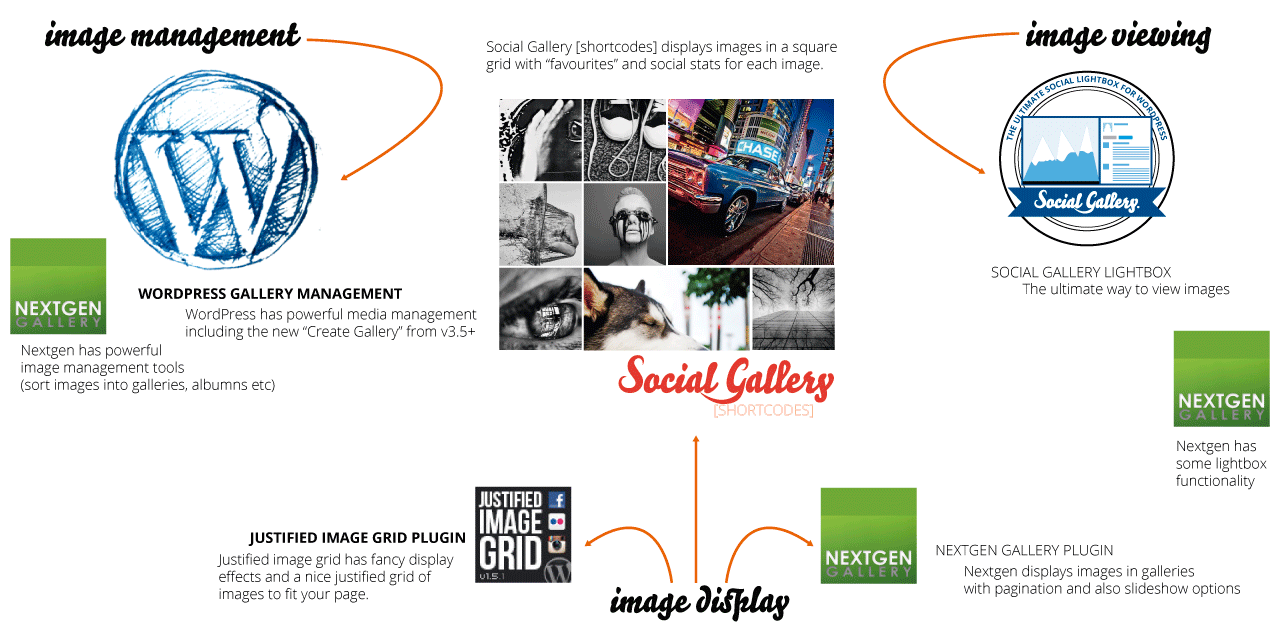
Social Gallery [shortcodes] is an image display plugin, this means it seamlessly links in with image management plugins such as the built in WordPress Media Library or NextGen. The plugin can then be used with any image viewer plugin, such as the awesome Social Gallery, or more standard viewers such as fancybox, or other lightboxes. The following image shows the three main areas of how you can use images on your site and where each of the plugins fit in.

image-functionalityPlugin Display Features


Screen Shot 2013-08-08 at 20.54.48


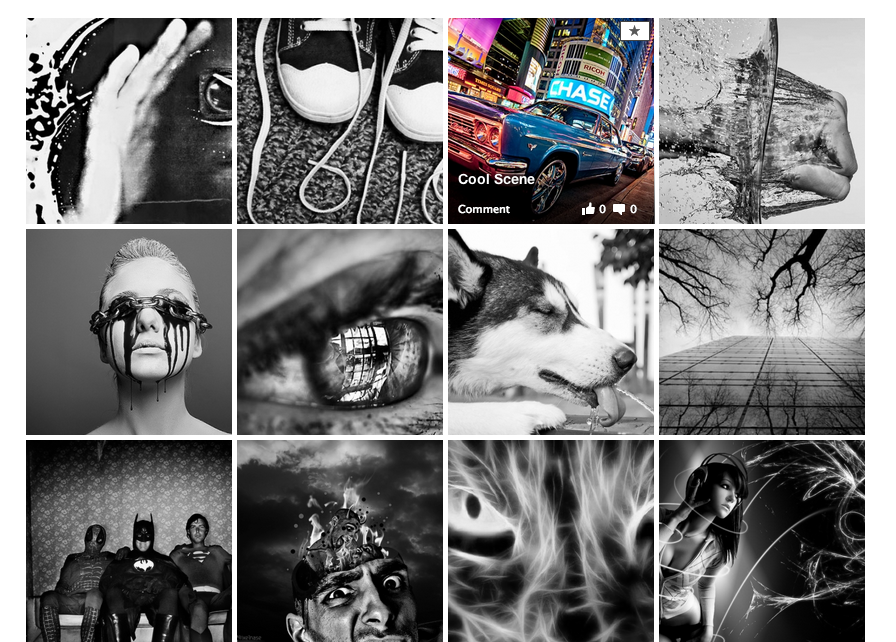
WordPress media library with a greyscale overlay effect for the images. This setting displays the images in greyscale and they come to life in colour upon hover. If a user marks an image as favourite it is shown larger and in colour to them. Click the image for the example.

  • Greyscale effect

  • Brings images to life

  • Favourites are shown large

  • Favourites are shown in colour

  • Favourites are saved per user


Shortcodes:
[socialgallery ids = '1,2' gray = 'true']

where ids are the id of your images, or if using NextGen
[nggsocial id = 1 gray = 'true']

where id is the id of your nextgen gallery


Screen Shot 2013-08-08 at 20.54.48


WordPress media library with full colour images. If a user marks an image as favourite it is shown larger to them. Click the image for the example.

  • Beautiful full colour

  • Dazzle your visitors

  • Favourites are shown large

  • Favourites are shown in colour

  • Favourites are saved per user


Shortcodes:
[socialgallery ids = '1,2']

where ids are the id of your images, or if using NextGen
[nggsocial id = 1]

where id is the id of your nextgen gallery


Screen Shot 2013-08-08 at 20.54.48

Image effect on hover

On hover the images display the name of the image and the social stats (how many likes and comments the image has had). It also displays the “favourite” icon to allow users to mark images as favourite

  • Live social stats per image

  • Image title displayed

  • Link to the image page

  • Light up if greyscale effect


Allow users to mark their favourite

The plugin allows your users to mark which images are their favourites and these will be remembered by the plugin and displayed to them in their own special way.
favourite1
Screen Shot 2013-08-08 at 20.54.48
favourite2
Screen Shot 2013-08-08 at 20.54.48


“Your Favourites”

Screen Shot 2013-08-08 at 20.54.48

Have a page displayed to your users showing them their favourite images.

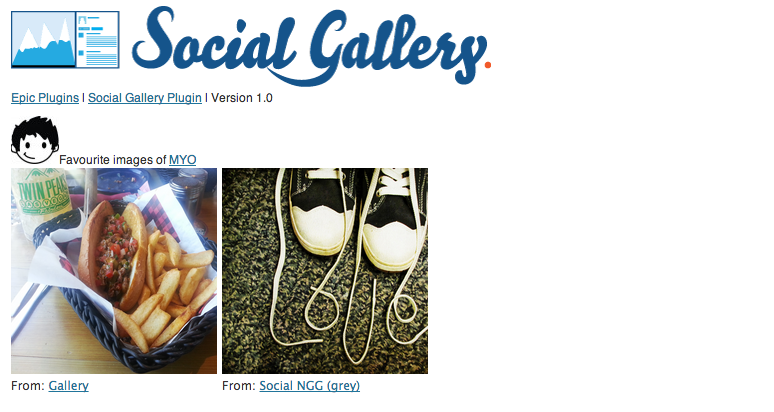
  • User favourites gallery

  • Perfect for a profile page


[sgfavourites gray = 'true']
for greyscale or
[sgfavourites]
for colour.


Social Sharing Features


The plugin is ram packed with lots of cool social sharing features. It displays you live social stats for each of your images and lets you easily like and comment on images in each gallery. It is also built with the Social Gallery Photo Viewer plugin in mind to enable even greater sharing and liking of your images.


Screen Shot 2013-08-08 at 20.54.48


Click the like or comment icon and have the ability to make comments on the images right there on the gallery, simple and easy.

  • Get more likes and comments

  • Social proof drives even more likes

  • Increase traffic to your site

  • Make comments without leaving the gallery


Screen Shot 2013-08-08 at 20.54.48


The plugin is built with the Social Gallery Lightbox in mind, a user can click on your image and the likes and comments are displayed to them to allow them to easily make further comments and have extra Social feautures like tweeting and pinning images

  • Social Gallery [shortcodes] links in with the Lightbox

  • Over 20,000 users of the ligthbox plugin enjoy more viral images

  • Give your visitors the complete social experience


Special Features


The plugin wouldn’t be an Epic Plugin if it didn’t have some special features. As mentioned above the plugin can be used to store favourite images of your users. To be able to know who is who, the best way is to ask your users to register to your website. This plugin makes it super easy and it will BOOST your website membership.


Screen Shot 2013-08-08 at 20.54.48

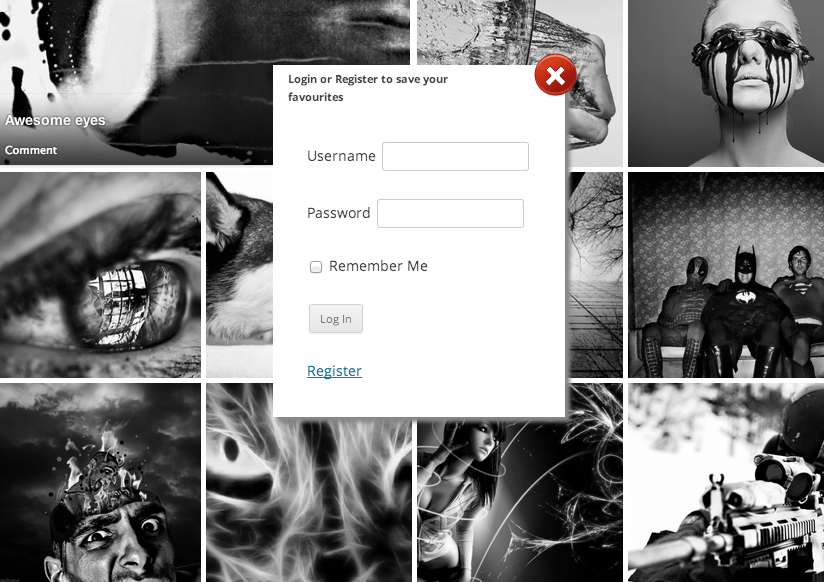
Modal Sign up form

Want more members to your site? More leads? more people to follow you and increase the size and reach of your site? Social Shortcodes helps you get there.

  • To save favourites users are asked to sign up

  • Boost membership

  • Widen your reach (email campaigns)

  • Provide extra features for your members


Screen Shot 2013-08-08 at 20.54.48

Boost your Social Stats

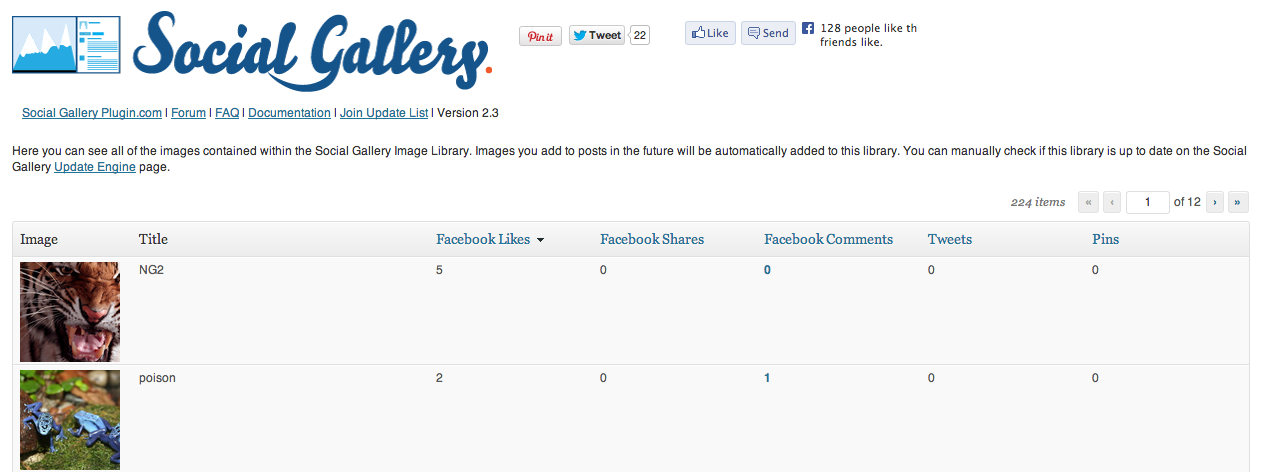
Easily manage your social stats of the images. Improve the social stats using the on screen social stats included with the shortcodes plugin.

  • Order your social stats

  • See likes, comments, pins, tweets

  • Requires Social Gallery Lightbox plugin

  • Requires Social Stats Add on


social-gallery-and-nextgen-gallery-compatible.png

The plugin is designed to work with the popular NextGen gallery plugin. Display your nextgen galleries using a simple shortcode based on your NextGen gallery ID.

Admin Features


The social shortcodes plugin allows you to view which images are your users favourites.

Screen Shot 2013-08-08 at 20.54.48

Users favourites

Allowing your users to mark their favourites also gives you the ability to track via the admin panel which images they like along with links to the gallery page they like the image on.

  • User favourites information

  • Link to gallery


sg-buy


Plugin feature list


  • Live social stats on each image

  • Facebook comments on the gallery without leaving the page

  • Responsive layout (change the browser size)

  • isotope masonry

  • perfect grid (no gaps)

  • Stats update via jQuery call to Facebook after page load

  • Greyscale cross browser support

  • NextGen compatible

  • Social Gallery Lightbox compatible

  • WordPress Gallery compatible

  • 3 super easy shortcodes, [socialgallery ids = ’’], [nggsocial id = ’’], [sgfavourites]

  • greyscale variants

  • WP user favourites stored

  • WP user admin management view your users favourites


Change Log


v1.4


Fixes bug in options save

v1.3


Fixes img files missing causing "options saved" message not to appear

v1.2


Fixes some CSS bugs
Improves NextGen compatibility
Includes auto update core for future updates

v1.1


initial CodeCanyon release
Adds greyscale
Adds user favourites
Adds admin features


v1.0


pre release beta version

Use-your-Drive | Google Drive plugin for WordPress (Utilities)

Use-your-Drive | WordPress Plugin


This plugin will help you to easily integrate Google Drive into your WordPress website or blog. Use-your-Drive allows you to view, download, delete, rename files & folders directly from a WordPress page. You can use Use-your-Drive as a filebrowser, gallery, audio- or video-player!


NOTE: Use-your-Drive uses the Offical Google API.


Features


Filebrowser


  • View Google Drive folders & files directly on your site

  • Upload form so users can upload (multiple) files to Google Drive

  • Add, delete and rename files & folders

  • Download files as zip file

  • Search your Google Drive for files & folders

  • If needed you can restrict users so they are only able to use their ‘own’ Google Drive folder


Gallery


  • Great looking grid with lightbox

  • Folder thumbnails shows whats inside the folder

  • Customize image row height

  • Shuffle images

  • Add, delete and rename images

  • Download images as zip file


Audio & Video


  • Streams audio files directly from your Google Drive with a HTML 5 audioplayer with flash-fallback.


    • .m4a (AAC/H.264)


    • .oga (Vorbis/Theora)


    • .mp3


  • Streams video files directly from your Google Drive with a HTML 5 audioplayer with flash-fallback.


    • .webmv (Vorbis/VP8)


    • .ogv (Vorbis/Theora)


    • .m4v (AAC/H.264)


General


  • Sort files by name, size or modified date


  • Restrict viewing by file extension and file or folder name


  • Restrict uploading files by file extension


  • Restrict which user can see, download, rename or delete your files or upload new ones. You can set the required capabilities by yourself with WordPress Capabilities


  • Secure OAuth 2 authentication


  • Powerful but intuitive shortcode generator


  • Multi language supported


  • And finally… All elements are responsive!


Do you miss a feature? Let us know!

Requirements


  • At least PHP 5.3 with cURL extension


Screenshots


Use your Drive - Google Drive plugin for WordPress


Changelog


= 1.0.1 (26 November 13) =


  • Added WordPress Multi-Site support


  • Bug fix caching Google API requests


  • Bug fix streaming audio/video files


  • Bug fix Lightbox gallery


= 1.0 (22 November 13) =


  • Initial release version

Rabu, 04 Desember 2013

Pinboard - Simple To-Do List Application (Miscellaneous)

Pinboard is web application which will help you to organise your daily life. Tasks are sorted into groups and every task is draggable so you can manage your tasks in same way you would do on classic pinboard, like the one in your home.


Features


Groups sharing is possible only with registered users on Pinboard. User should enter valid email address, script then checks if email is valid and if user with that email exists. After that, confirmation email is sent to your friends email address and if he or she accepts your shared group then your group will appear in his/her ‘Shared tab’. Now both of your can add or remove tasks but only owner of group can delete whole group.


In settings dialog you can change name, last name, email, password and avatar.


Background images are also changeable. Click on your username and select ‘Background’ option. You are presented with 6 background images but you can upload your own as well.


You can view received or sent messages in ‘Messages’ dialog. When message is opened you can reply directly by clicking on ‘Reply’ button. Also, all messages are removable so if you inbox becomes cluttered you can clean it up.


All users have their own profile page where other users can see their basic information like: avatar, name, last name, email address and date when they registered.


Profile search, which you can find at top of Pinboard, will help you finding your friends on Pinboard. After you found desired profile, you can send a message to that person or share a group.


More coming soon…


Changelog


(2013-11-29) – Upgraded protection against hacking